Learning Center Section
The Learning Center section is used to access training and help resources, such as the help file, the What's New publication for the current software release, and the contact information for Reynolds and Reynolds support personnel.

|
The Learning Center section displays on the More Menu. To access the More menu, click the |
 (More) icon on any screen in the XtreamService application.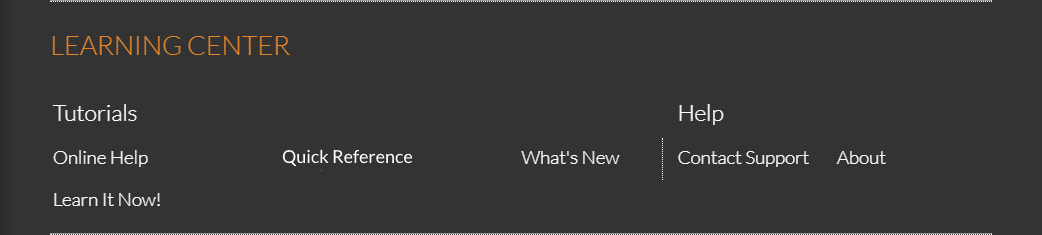
To access a help feature, click a link in the Learning Center section. For example, click the Online Help link to display the help file for the XtreamService application.
The following links in the Learning Center section can be used to access additional help features.
 Online Help
Click the Online Help link to access the help file for the XtreamService application in a separate browser tab.
The help file can be used to review the following:
-
What's New topics. Topics in the What's New folder in the help file describe the software enhancements implemented for the most recent software release.
The purpose of What's New topics is to help keep you informed of enhancements to the XtreamService application so you can more effectively utilize the software.
-
Help topics. Topics in the help file contain detailed information about the screens and features available in the XtreamService application. This information can be used to determine the purpose of a screen or window and the sections, fields, buttons, and links on the screen or window.
-
Quick Reference. The Quick Reference folder includes detailed procedures that describe how to perform various operations within the XtreamService application. Procedures always begin with the phrase "How to", such as "How to Create and Send a Sales Campaign". The procedures are explained step-by-step, and related procedures are grouped together.
Quick Reference
Click the Quick Reference link to access a list of detailed procedures that describe how to perform various operations within the XtreamService application. Procedures always begin with the phrase "How to", such as "How to Create and Send a Sales Campaign". The procedures are explained step-by-step, and related procedures are grouped together.
What's New
Click the What's New link to access a list of What's New topics for the most recent software release in a separate browser window. What's New topics provide detailed explanations of the enhancements that were made to the application for the most recent software release.
The purpose of What's New topics is to help keep you informed of enhancements to the XtreamService application so you can more effectively utilize the software.
Learn It Now!
Click the Learn It Now! link to access the XtreamService Learn It in a separate browser window. The XtreamService Learn It is a short, interactive training module centered on walking you through the basics of how to use the various screens in the XtreamService application.
Contact Support
Click the Contact Support link to display the Contact Support window, where contact information for Reynolds support personnel can be reviewed.
About
Click the About link to display the About window, where additional information about the software, such as the current application version number, can be reviewed.
Click here for a list of products that may be mentioned in this help file.